
Planning your first token enabled event
Approaching your first token deployment requires a structured chronological path that moves logically from initial theory to a fully working physical setup. You need to connect physical hardware with your backend systems in a way that respects your existing infrastructure. Following a sequential checklist allows your team to verify each integration point systematically before you commit to purchasing equipment. This step-by-step preparation ensures your implementation leads have the confidence to handle the technological shift without unnecessary disruption to your workflow.
Mapping out hardware and infrastructure needs
Before any physical deployment begins, you must verify that your chosen token specification matches the physical readers and the broader event site infrastructure. Evaluating your core hardware needs prevents you from purchasing equipment that lacks the processing power or security features required for your specific venue. This phase highlights the exact variables that affect how well your new technology integrates with your current systems. Gathering this information early gives your team a clear blueprint for the entire physical layout.
Defining technical requirements
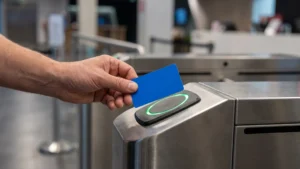
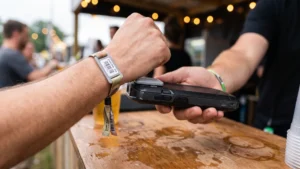
The core hardware for an event includes active processing chips that initiate contact with passive tags and antennas that capture the responding signal. You also need local microcontrollers, which are small computers that process raw radio frequency signals before sending them to your main database. Your chosen readers must feature secure hardware modules to safely store encryption keys and prevent the cloning of event wristbands. Depending on your touchpoints, you will deploy a mix of stationary turnstiles for fast validation and handheld mobile terminals for roaming staff.
Checking site connectivity
The speed at which your tokens validate depends heavily on your site connectivity and the network delay between your local application and the central identity provider. If your system requires real-time network checks for every single scan, high latency will severely slow down the user experience at the gates. You can mitigate this by using stateless tokens, such as JSON Web Tokens (JWT), which validate locally in the reader’s memory and take less than a millisecond. Equipping all entry checkpoints with low-latency wireless or wired internet ensures your backend synchronises properly and maintains smooth attendee flow.
Assigning team responsibilities
A successful technical deployment relies on a tiered architecture of team roles tailored to preparation, setup, and live operation phases. Your Technical Project Manager (TPM) owns the master schedule and coordinates all hardware deliveries to ensure everything arrives on time. Network engineers and power leads handle the central infrastructure, ensuring clean electrical delivery and stable internet routing across the venue. Finally, wireless technicians and deployment runners focus on the physical mounting and tuning of individual devices to handle the high density of your event crowd.
Configuring your software backend for token data
Once your physical hardware is defined, you must establish a clear communication path between the scanning devices and your existing event management software. When a token makes contact with a reader, the local device must translate the raw signal into a meaningful data format that your database understands. This translation process requires configuring your backend to accept specific payloads, ensuring that every tap logs accurately in your central system. Establishing this connection early clarifies exactly how data flows from the attendee’s wristband directly into your live reporting dashboards.
Your team will need to map specific data fields so that the hardware outputs match the exact structure your software requires. If your event platform expects a specific timestamp format and the reader sends a different one, the backend will reject the interaction and create synchronization errors. You must also establish clear caching rules so that readers can operate offline and queue transactions locally if the venue loses internet connectivity momentarily. Testing these data flows gives your project manager confidence that the software will process high volumes of information without failing under pressure.
Executing a structured testing sequence
Before your event goes live, you must execute a comprehensive testing sequence that verifies your hardware and software communicate flawlessly under realistic conditions. Testing individual components in isolation ensures that you can identify the root cause of any misreads or connectivity drops easily. This repeatable process builds your confidence by proving that data moves correctly from the physical tag all the way to your backend interface. Following these precise steps helps your team avoid unexpected failures when thousands of attendees begin interacting with the systems.
- Isolating hardware components: You should begin by verifying the firmware versions, antenna connections, and power levels of every individual reader before connecting them to the network. Your team must then test different token types against target surfaces to establish a reliable baseline read range. This initial isolation ensures that the physical equipment functions exactly as expected without interference from complex software rules. Confirming basic hardware stability gives you a clean foundation for the more advanced integration steps that follow.
- Verifying software connectivity: Once the hardware proves reliable, you must confirm that your software layer can establish a stable connection with the readers. You can test this by placing a single token in front of the antenna to ensure the backend application accurately displays the raw data string. This step verifies the translation logic, proving that your event platform understands the exact data format the reader sends. Resolving formatting mismatches at this stage prevents widespread synchronization errors during live operations.
- Simulating high-density environments: Static tests do not replicate the complex radio frequency noise generated by thousands of moving people at a real event. You need to simulate the physical blocking caused by human bodies and the competing wireless signals from mobile phones to see how the readers cope. Measuring signal strength and dropped data packets during these simulations highlights where you need to adjust antenna angles or transmission power. Tuning your equipment for a crowded spectrum ensures your system will perform reliably when the venue reaches maximum capacity.
- Stress testing failure scenarios: A truly robust system must remain stable when physical components fail or network connections drop unexpectedly. You should deliberately disconnect a reader during a scan cycle to verify that it buffers the transaction locally and synchronizes properly once the connection returns. Simulating damaged tokens or backend database delays allows your team to see if the software triggers the correct manual override alerts. Testing these worst-case scenarios guarantees that your staff have a reliable contingency process if the technology falters.
Preparing your staff for token handling
Even the most sophisticated technological deployment relies heavily on the people who operate the readers and assist attendees at the gates. You must train your event staff to confidently handle the equipment and resolve common technical issues without causing bottlenecks. Explaining these concepts clearly equips your project manager to translate technical mechanics into practical instructions for non-technical team members. Preparing your staff thoroughly ensures that they become a seamless extension of the automated system rather than a point of friction.
Operating the hardware
Your frontline team needs clear instructions on how to position the handheld scanners or monitor the stationary turnstiles for maximum efficiency. They must understand the correct scanning angles and the optimal distance required for the radio frequency field to register the token instantly. Providing hands-on practice sessions allows them to feel the rhythm of a successful scan and recognize the visual or audio cues that confirm a valid entry. This practical familiarity prevents hesitation at the gates, keeping the crowd moving smoothly during peak arrival times.
Handling token misreads
When a wristband or badge fails to scan, your staff must follow a specific sequence of actions to resolve the issue quickly. You should train them to check for physical token damage and verify that the reader itself has an active network connection. If a secondary scan fails, the staff member must know exactly how to trigger a manual override in the software without delaying the queue. Giving them a concrete troubleshooting process removes the panic from the situation and drastically reduces overall downtime.
Answering attendee questions
Attendees often have questions about how the new technology works, especially concerning data privacy or the mechanics of cashless balances. Your team should be prepared with simple, reassuring explanations that focus on the convenience and security of the token system. Staff must know how to direct complex account inquiries to a dedicated support desk rather than attempting to solve backend issues at an entry gate. Equipping them with consistent answers builds trust with your guests and maintains a professional atmosphere throughout the venue.
Monitoring systems during the live deployment
Once attendees arrive and begin using their tokens, your implementation lead must shift into a continuous monitoring posture. Stationing a dedicated operator at a central dashboard allows you to track bandwidth usage, hardware temperatures, and device uptime across the entire venue. Watching these real-time metrics helps your team spot anomalies, such as a sudden drop in scan rates at a specific gate, before they cause noticeable queues. This proactive observation positions your project manager as the calm center of operations who relies on hard data rather than reacting blindly to radio calls.
Effective monitoring also involves tracking the synchronization status between your local edge devices and the central cloud database. If a specific area of the venue experiences heavy cellular congestion, you might notice that readers queue their data locally rather than uploading it instantly. Your network team can then decide whether to adjust wireless access points or allow the system to operate safely in offline mode until the crowd disperses. Maintaining visibility over these data flows ensures that your reporting remains accurate and your financial reconciliations proceed without missing transactions.
Resolving common technical interruptions
Technical interruptions will occasionally occur, making it essential to outline a sequential set of actions for when standard operations fail. Equipping your team with actionable contingency plans allows them to handle lost tokens or broken readers with minimal disruption to the event. You must provide concrete steps rather than theoretical concepts so that your staff knows exactly what to do in a high-pressure environment. A well-rehearsed resolution process ensures that temporary hardware glitches do not escalate into permanent data losses or frustrating attendee experiences.
- Replacing lost or damaged tokens: When an attendee loses their credential, your staff must immediately deactivate the original token in the central database to prevent unauthorized access. The team can then provision a new physical wristband or badge and link it to the user’s existing profile. This process ensures that any digital currency balances or specific zone permissions transfer seamlessly to the replacement hardware. Handling replacements swiftly maintains venue security while keeping the attendee completely satisfied with the customer service.
- Rebooting unresponsive hardware: If a stationary reader or handheld terminal stops registering scans entirely, the operator must execute a structured power cycle. Your staff should first verify the physical cable connections and battery levels before restarting the device’s internal software application. Reconnecting the reader to the network carefully ensures that any locally cached data uploads safely without being overwritten or corrupted. Training your team on this precise reboot sequence prevents the accidental deletion of critical entry logs during a busy shift.
- Managing offline synchronization errors: High-density crowds often cause intermittent wireless drops that force readers to store scan data locally until the connection stabilizes. If the upload order scrambles upon reconnection, an older transaction might overwrite a newer one and create a synchronization mismatch. Your technical leads must monitor the database for these timing errors and apply strict event-driven ordering protocols to resolve chronological conflicts. Addressing these synchronization issues promptly ensures that cashless balances remain accurate and anti-passback security rules function correctly.
Reviewing data and system performance
After the event concludes, you must evaluate the success of your first deployment by analyzing the data collected across all your systems. Reviewing the peak scan rates, average validation times, and hardware uptime logs helps your team understand exactly what worked and what requires adjustment. Identifying the specific gates that experienced network drops or the token types that generated the most misreads gives you objective knowledge for future planning. This analytical approach reinforces the idea that every event yields valuable data that you can use to refine your technical architecture continuously.
You should also gather feedback directly from the frontline staff who operated the readers and managed the attendee queues. Comparing their practical experience against the system data often reveals operational bottlenecks that pure technical metrics might miss. If the dashboard shows fast scan times but staff report frequent attendee confusion, you know that your physical signage or pre-event communication needs improvement. Combining hardware data with human feedback ensures your next token rollout will be even smoother and more efficient than your first.
Finalising your token deployment checklist
Finalising your deployment checklist provides a satisfying conclusion to your planning phase and leaves your team feeling fully prepared to handle the live environment. Following a chronological path from hardware selection to live monitoring ensures you build a highly reliable technical foundation for your event. As a neutral educational resource, RFID & NFC provides the objective standards you need to confidently evaluate your integration options. If your team has general inquiries about these technical frameworks, you can reach out to contact@rfidandnfc.com to explore the concepts further.
How should we choose the right token format for a first event?
Choose the token form that fits your crowd and re-entry needs. Near Field Communication (NFC) wristbands are durable and water resistant, so queues move quickly outdoors. Badges suit events where you must show identity. Mobile passes reduce hardware but depend on attendee phones and battery.
What network setup keeps validation fast if the internet is unreliable?
Favor local validation to avoid network delays. With JSON Web Token (JWT) access, your application verifies signatures on site, so taps finish in under a second. Cache allow and deny lists on each Radio Frequency Identification (RFID) reader. Use wired Ethernet or Wi-Fi wireless at gates with Power over Ethernet, and keep cellular backup.
What pre-event tests should we run to prove the system is ready?
Run a layered test that proves hardware and software end to end. Check RFID reader power and firmware, then run single tag, bulk, and moving tap reads. Add interference and offline failover tests. Target sub second taps and a delivery rate above 98 percent.
How do we prevent data sync errors between readers and the event platform?
Prevent sync errors by designing for ordering, timing, and safe retries. Keep clocks aligned and attach a unique event ID to each tap so late data cannot overwrite newer records. Use short lived JWT access with revocation. Make writes idempotent so repeats do not change the final state.
Which roles should we assign for deployment and live support on show day?
Assign clear owners for planning, deployment, and live support. A Technical Project Manager coordinates schedule and vendors. Network engineers run the core network. Radio frequency (RF) technicians deploy wireless and RFID readers. A Network Operations Center (NOC) watches dashboards, and floor support teams fix issues quickly with a clear escalation path.