Preparing your team for a token based event
Training your staff and suppliers before the event begins gives them the practical foundation they need to operate confidently under pressure. When front-line workers understand exactly how the hardware functions, they handle visitor interactions more smoothly and reduce the likelihood of queue bottlenecks. A comprehensive briefing session should cover the physical handling of the devices, the expected workflow for visitor interactions, and the basic steps for identifying when a system needs technical support. By investing time in this preparatory education, you empower your team to focus on delivering a seamless experience rather than struggling with unfamiliar technology.
Steps for issuing tokens and managing reader stations
Standardizing how your staff distribute credentials and operate hardware ensures a consistent experience across all entry points and vendor stalls. Providing a concrete sequence for these tasks turns technical interactions into simple, actionable steps that even non-technical event staff can master quickly. This structured approach helps your team integrate the technology seamlessly into their existing workflows without feeling overwhelmed. You can guide your staff through the essential procedures using the following standardized steps.
- Verifying identity and registration: Your staff should begin by confirming the visitor matches their ticketing profile using a standard photo identification document. This step prevents unauthorized access and ensures the digital record aligns perfectly with the person standing at the station. Connecting the right profile to the physical credential forms the foundation of your secure access control system. Establishing this habit early prevents downstream complications when visitors attempt to enter restricted zones later in the day.
- Pairing the physical credential: Once the identity is confirmed, the staff member must scan a new token using the designated registration hardware to link it to the visitor profile. This action writes the Unique Identifier (UID), which is a specific digital serial number, into your central database so the system recognizes the token at every subsequent access point. Staff must verify the pairing confirmation on their screen before handing the credential to the visitor. Completing this digital handshake accurately ensures the visitor experiences no friction when they reach their first scanning gate.
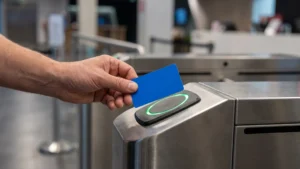
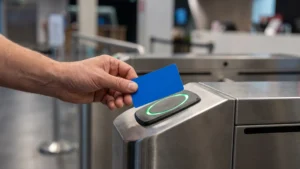
- Operating the entry scanner: When visitors approach a controlled zone, staff should guide them to hold their token within a few inches of the scanner until the indicator light confirms a successful read. If the reader flashes red or denies access, the staff member must politely direct the visitor to a designated troubleshooting area to keep the main queue flowing smoothly. Clear communication during this step prevents confusion and maintains a steady pace of entry for everyone else. Training your team to handle these minor interruptions calmly reinforces a professional atmosphere across the entire venue.
Handling lost tokens and reader registration errors
Preparing your team for common technology failure points ensures they can maintain a smooth visitor experience without panicking or stalling the queue. Technology hardware occasionally encounters physical interference or misplacement, making a structured troubleshooting response essential for front-line operations. By equipping your staff with exact protocols for missing credentials and unresponsive hardware, you transform potential crises into manageable administrative tasks. As an educational resource, RFID & NFC provides these practical troubleshooting solutions so project managers can easily build them into mandatory briefing sessions.
Replacing a lost token securely
When an attendee reports a missing credential, your staff must execute a strict revoke-and-reissue protocol to prevent unauthorized access. First, the team member verifies the identity of the visitor and flags the original UID as lost in the central event management database. This real-time synchronization instantly invalidates the missing token across all entry scanners, meaning anyone attempting to use it will be denied entry and flagged by security. Finally, the staff member provisions a new token, linking it to the verified profile and restoring access while maintaining the vital one-in, one-out security rule.
Troubleshooting an unresponsive reader
Most registration failures stem from power drops or environmental interference rather than complete hardware breakdowns. To diagnose an unresponsive scanner, your staff should first perform a free-air control test by holding a known-working tag a few inches from the antenna to verify basic functionality. If the device fails to read, the team must inspect the power cables and network connections before checking for nearby metal structures or liquid containers that absorb Radio Frequency (RF) signals. If physical connections and environmental factors appear correct, rebooting the device by disconnecting the power source for ten seconds often restores normal communication with the central server.
What should our team do first when someone loses a token?
Verify the attendee’s identity, then immediately deactivate the lost token and link a new one to their profile. If you use radio frequency identification, known as RFID, update the central database so only the new token is active. Test the replacement at an RFID reader. Record the action and reason.
How do we prevent fraud during token replacement?
Enforce a one in, one out rule so two tokens never stay active for one person. Require government ID or original purchase credentials before issuing a replacement. Log time, staff member, and reason for traceability. Enable alerts if a revoked token is presented at an RFID reader.
What quick checks should staff make when an RFID reader stops registering?
Start with power and cabling, checking lights and reseating plugs. Do a free air test using a known working tag inches from the antenna to confirm the reader works. Move away from metal or liquids that block radio signals. If issues persist, confirm network or port settings and reboot.
What causes reader registration failures and how can we reduce them on the day?
Most failures come from environment, orientation, or configuration. Keep metal and liquids away from antennas, and avoid wearing badges flat against skin by using a lanyard or spacer card. Space adjacent readers to prevent overlapping radio signals. Match tag and reader frequency, maintain stable power, and avoid stacking multiple tags.
How should we set up the help desk for replacements and what fee policy works?
Create a dedicated troubleshooting desk with RFID programmers and live access to the central system. Train staff on verify, deactivate, issue, and test steps to keep lines moving. Track blank token inventory carefully. Many events charge a non refundable replacement fee, often 20 to 50 dollars, and publish it clearly.